Showing posts with label Android. Show all posts

Thursday, 12 March 2015

A new reference app for multi-device applications

It is now possible to bring the benefits of your app to your users wherever they happen to be, no matter what device they have near them. Today we’re releasing a reference sample that shows how to implement such a service with an app that works across multiple Android form-factors. This sample, the Universal Music Player, is a bare-bones but functional reference app that supports multiple devices and form factors in a single codebase. It is compatible with Android Auto, Android Wear, and Google Cast devices. Give it a try and easily adapt your own app for wherever your users are, be that a phone, watch, TV, car, or more!


Playback controls and album art in the lock screen.

On the application toolbar, the Google Cast icon.


Controlling playback through Android Auto


Controlling playback on an Android Wear watch


This sample uses a number of new features in Android 5.0 Lollipop, like MediaStyle notifications, MediaSession and MediaBrowserService. They make it easy to implement media browsing and playback on multiple devices with a single version of your app.


Check out the source code and let your users enjoy your app from wherever they like.


Posted by Renato Mangini, Senior Developer Platform Engineer, Google Developer Platform Team

Monday, 3 November 2014

Your Chance to be on TV!

By Tarjei Vassbotn and Dan Galpin, Developer Advocates, Android TV


We’re excited to see the launch of Nexus Player, the first consumer streaming media player running Android TV. Android TV delivers an entertainment experience tailored for users, including movies, shows, games and more.
Now is a great time to develop apps for Android TV that reach a whole new audience.


Starting today, you can publish your apps for Android TV on Google Play, the largest digital store for apps and games. We’ve provided guidance on how to get started building great apps for Android TV in this post.


"Google has done an insanely good job to ease the developer’s task of creating a TV application, mainly thanks to the Leanback support library. It literally takes 2 hours to create a fully working and possibly fancy app, which is awesome."


- Sebastiano Gottardo


A high bar for quality experiences


We want to offer the best possible experience for users to enjoy your apps and games. To make this possible, your Android TV app must meet the basic requirements for usability. When your app meets these requirements, users will be able to discover and download it directly on their Android TV devices.


Even if you have already uploaded your app to the Google Play Developer Console, you will need to add TV graphics and screenshots, and opt-in to distribution on TV on the Pricing & Distribution page. For complete information about the requirements and process of publishing your Android TV app for Google Play, make sure to check out the publishing documentation.


Get started!


With our Leanback Library we’ve made it easy for you to extend your existing app to the TV screen or even build a completely new app for Android TV. For a quick look at the Leanback Library, check out this DevBytes video.


We’ve only begun scratching the surface of what’s possible with this new form factor, and we are very excited to see what you will build, start developing today!


Wednesday, 17 September 2014

Messaging on Android Wear

By Timothy Jordan, Developer Advocate


Sending messages on Android Wear feels as easy as it was to pass notes back in school. Remember when your friends always felt nearby? That feeling is why I love staying in touch with friends and family using my wearable.


Your messaging app likely already works on Android Wear. With just a few more lines of code you can unlock simple but powerful features that let your users communicate even more effortlessly.


Message notifications for free


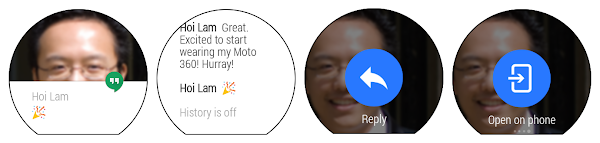
If your Android app uses notifications to let the user know about new messages, these will work automatically on their wearable. That is, when you build notifications with the NotificationCompat.Builder class, the system takes care of displaying them properly, whether they appear on a handheld or wearable. Also, an "Open on phone" action will be added so it's easy for the user to reply via the app on their handheld.


Google+ Hangouts message.


Reply like a champ


Messages on Wear get really exciting when you can reply directly from the watch with your voice. In addition to being super convenient, this always gives me a Dick Tracy thrill… but maybe that's just me. =]

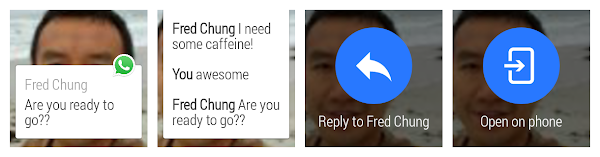
To add this functionality, it's as simple as adding an action to the notification via WearableExtender that includes a RemoteInput to your notification. After the user replies, you'll just grab their voice input as a string from the RemoteInput included in the Intent. You can even include text responses the user can easily select from a list by passing an array of them to the setChoices method of the RemoteInput. More details and code can be found here.


WhatsApp message with the reply by voice action.


See who is texting


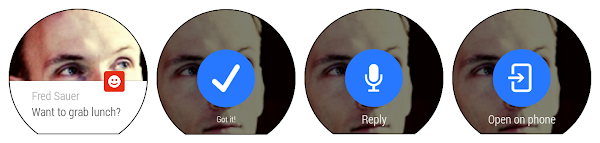
Messages are more meaningful when you are connected to the sender. That's why we recommend you include the photo of the sender as the background of the notification. As soon as the user taps into the message, they also see who it's from, which will make it matter more (or maybe that other thing, depending on who it is).


You should add a photo with a resolution of at least 400x400, but we recommend 640x400. With the larger size, the background will be given parallax scrolling. If the background is to be included in the apk, place it in the res/drawable-nodpi directory. Then call setBackground() on your WearableExtender and add it to your notification. More details and code can be found here.


Path Talk message with a clear picture of the sender.


Custom actions


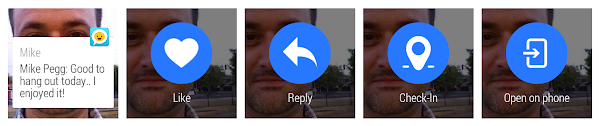
Basic notifications with reply by voice and a good background image are the most important parts to get done right away. But why stop there? It's easy to extend the unique parts of your service to the wearable. A simple first step is adding in a custom action the way Omlet does. These are just actions defined with the WearableExtender that raise an intent on the handheld.


Omlet includes two extra actions with every message: Like and Check-In. Check-In sends along the user's current location.


Custom Layouts


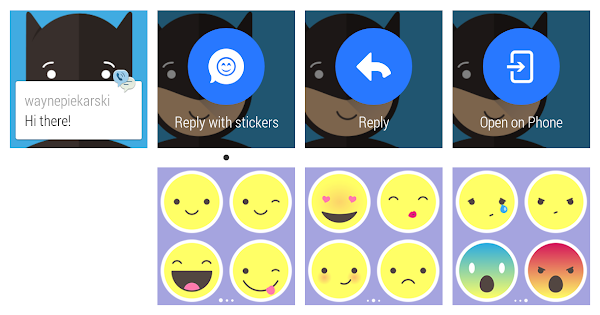
Custom interaction on the wearable, like the following example from TextMe, is straightforward to implement. They have what appears to be a simple notification with an action that allows the user to select an emoticon. However, to show this emoticon picker, they are actually issuing a notification from the wearable. The round trip looks something like this:


  1. The handheld gets a new message, issues a notification setLocalOnly(True), and sends a message to the wearable using the Data Layer API

  2. The wearable receives that message using the WearableListenerService and issues a custom notification with a PendingIntent to launch an activity when the user views the notification

  3. That activity has a custom layout defined with the Wearable UI Library

  4. Once the user selects an emoticon, the wearable sends a message back to the handheld

  5. The handheld receives that message and sends it along to the server


Custom layouts are documented in more depth here.


TextMe allows users to reply with a quick emoticon.


Next steps


Make your messaging service awesome by providing rich functionality on the user's wearable. It's easy to get started and easy to go further. It all starts at developer.android.com/wear.


Tuesday, 16 September 2014

Google Play Services 6.1

gps


Google Play services 6.1 is now rolled out to devices worldwide, bringing you the newest features from Google to help you optimize your apps. You can get started developing today by downloading the Google Play services SDK from the Android SDK Manager.


Google Play services 6.1 adds Enhanced Ecommerce analytics support from Google Tag Manager and offers new improvements to the Google Drive Android API. With the latest release, we’re also including a refresh of the Google Fit developer preview, so that you can test your fitness apps on any Android device.


Analytics


Launched in Google Play services 5.0, Enhanced Ecommerce is an analytics extension designed to provide richer insights into pre-purchase shopping behavior and into product performance. It’s a great way to gain visibility into the full customer journey, helping you understand how different user acquisition campaigns are performing at a granular level. By including support for Enhanced Ecommerce in Google Tag Manager with the latest release of Google Play services, we are supercharging your ability to regularly update and manage tags on mobile apps more easily, so that you can consistently measure product impressions, shopping funnel events, and more.


Drive


To make it easier to use Drive, we added enhancements to the Google Drive Android API. With the new Completion Events feature, you can see when actions are committed to the server and improve the response time to conflicts. Material design elements have been incorporated into the File Picker UI, along with the addition of Recent and Starred views. A new setParents() method enables you to organize files and folders, while the previous Contents class has been replaced with a simpler DriveContents class.


Learn more about how to use these new features in this DevBytes video.


Google Fit


Initially introduced in August, the Google Fit Developer Preview has been refreshed to enable you to test your new fitness apps on any Android device. We expect to make additional changes to the APIs, so please check back with us on new developments.


Get Started


To get started developing, download the latest Google Play services SDK from the Android SDK Manager. For details on the new APIs, take a look at the New Features documentation. For setup information, see Set Up Google Play Services SDK.


To learn more about Google Play services and the APIs available to you through it, visit the Google Services section on the Android Developers site.


We hope you enjoy this release of Google Play services!


Android One: Bringing Your Apps to the Next Five Billion

Posted by Rich Hyndman, Developer Advocate


With the launch of Android One, more people across the world will have access to high-quality and affordable smartphones, packed with plenty of processing power and running the latest version of Android. These devices are available now in India and soon in Indonesia, the Philippines, and South Asia, so now is a good time to make sure your apps are ready for these new markets. This post highlights a few areas to consider.


These days, we often talk about smooth, 60fps transitions and keeping apps jank-free, and rightly so — performance is a critical metric for app quality. But in the user experience hierarchy of needs, an app should first and foremost do its job reliably and consistently.


If your app has search functionality, will user requests time out entirely? Do you think it is more important that a result is returned in a timely manner, or that the result is returned at all? If you're trying to build a robust app to reach the next five billion, it might be less about returning a result immediately, and more about returning a result at all. To address this challenge, why not include an option to users to “notify me with the results” when a search query is running on a slow network? Your app can then take as long as it needs to successfully retrieve the data in the background and show a notification when complete. The difference in user experience between an app that times out on a slower network and one that caters to user-specific needs will be very impactful for driving mobile app adoption.


There are also ways to test app performance without flying around the globe. The Android Emulator has network speed and network delay emulation settings, which can become an integral part of your testing strategy. If you’re testing on physical hardware, try turning off WiFi and switching the network to 2G only; how well does your app perform? Do search pages load? Does data refresh? These issues can often be fixed with relatively minor changes to your app logic or by leveraging a SyncAdapter. Check out our blog post on sync in the Google I/O app for more ideas.


Another key area for you to be aware of is app memory utilization. As part of the KitKat launch, we added new tools to the SDK for analyzing memory use and new APIs like isLowRamDevice(). We also just added a Memory Monitor to Android Studio 0.8.10 (currently in Canary). Much of this is documented in our Best Practices for Performance guide.


Moving forward, the Android L release has a strong focus on battery usage and analysis. Project Volta introduces new tools, such as Battery Historian and new APIs like JobScheduler, that can really help optimize battery use of your app.


By ensuring your app works well on slower networks, uses minimal memory, minimizes battery usage and doesn’t have a larger-than-necessary APK, you will help the next five billion discover, use and love your app.

Thursday, 31 July 2014

Learn How UX Design can Make Your App More Successful

By Nazmul Idris, a Developer Advocate at Google who's passionate about Android and UX design


As a mobile developer, how do you create 5-star apps that your users will not just download, but love to use every single day? How do you get your app noticed, and how do you drive engagement? One way is to focus on excellence in design — from visual and interaction design to user research, in other words: UX design.


If you’re new to the world of UX design but want to embrace it to improve your apps, we've created a new online course just for you. The UX Design for Mobile Developers course teaches you how to put your designer hat on, in addition to your developer hat, as you think about your apps' ideal user and how to meet their needs.


The course is divided into a series of lessons, each of which gives you practical takeaways that you can apply immediately to start seeing the benefits of good UX design.


Without jargon or buzzwords, the course teaches you where you should focus your attention, to bring in new users, keep existing users engaged, and increase your app's ratings. You'll learn how to optimize your app, rather than optimizing login/signup forms, and how to use low-resolution wireframing.


After you take the course, you'll "level up" from being an excellent developer to becoming an excellent design-minded developer.


Check out the video below to get a taste of what the course is like, and click through this short deck for an overview of the learning plan.


The full course materials — all the videos, quizzes, and forums — are available for free for all students by selecting “View Courseware”. Personalized ongoing feedback and guidance from Coaches is also available to anyone who chooses to enroll in Udacity’s guided program.


If that’s not enough, for even more about UX design from a developer's perspective, check out our YouTube UXD series, on the AndroidDevelopers channel: http://bit.ly/uxdplaylist.


Monday, 21 July 2014

KNOX Contribution to Android: Accelerating Android in the Workplace

Srikanth Rajagopalan, PM Director and Workplace aficionado


Recently at Google I/O, we announced a comprehensive set of new features that will allow IT organizations to easily deploy and manage Android devices in enterprise environments. These features will be built into the upcoming Android L release.


Samsung, with its KNOX technology, has been a thought leader in the enterprise mobility space. In order to accelerate Android adoption in the enterprise, we have partnered with Samsung to bring key KNOX functionality into Android, for the benefit of the entire Android ecosystem. We thank Samsung for their contributions. These new capabilities will make it easy for IT organizations to allow employees to bring their own Android devices to work (BYOD) and use them on the corporate network or to simply issue new Android devices to their employees. IT administrators will be able to manage a wide range of Android devices from many manufacturers, using third-party Enterprise Mobility Management (EMM) solutions that are built on top of the new enterprise APIs launching with Android L release.


Google and Samsung together designed the new enterprise APIs around three major concepts:


  • Device and data security

  • Support for IT policies and restrictions

  • Mobile application management


Device and data security


At the core of the expanded enterprise capabilities being introduced in Android ‘L’ lies a set of technologies that are designed to keep personal and corporate data both separate and safe. We achieve the data separation by building on the existing multi-user support in Android: personal and corporate applications will run as two separate Android users. Data is kept safe by using block-level disk encryption as well as verified boot technology. For those of you familiar with KNOX, this is analogous to KNOX Workspace. EMMs will be able to take advantage of new Android SDK APIs to enable the creation of a managed profile, which is where all corporate applications and data will reside.


Support for IT restrictions and policies


EMMs can use new Android SDK APIs , which have evolved from KNOX APIs, to allow IT admins to enforce a wide set of policies, ranging from system settings and certificate provisioning to application-specific (e.g. Chrome) configurations and restrictions.


Mobile application management


EMMs will be able to use new backend APIs, adapted from KNOX APIs and built around strong security principles for on-device app deployment, to allow IT admins to curate the corporate application catalog and to remotely deploy applications to the managed profile on the employees’ devices.


We encourage developers interested in the new Enterprise APIs to download and test the Android L Developer Preview. For developers who have already built applications using Samsung KNOX APIs, Samsung will be providing a KNOX Compatibility Library that will let such applications run on all Android L devices.


You can read more about this collaboration on the Samsung KNOX blog. Stay tuned for additional details.


Tuesday, 15 July 2014

Learn to Think Like an Android Developer


By Reto Meier, Head of Scalable Developer Advocacy


Today I’m proud to announce the latest resource for learning to develop Android apps: Developing Android Apps: Android Fundamentals.


Android Fundamentals is an online training course featuring Google Developer Advocates Reto Meier, Dan Galpin, and Katherine Kuan, working with the team at Udacity that’s advanced and technical enough for experienced developers who are new to Android — maybe even new to mobile — but not new to programming.


The course offers step-by-step training in which you’ll build an Android app, and learn best practices of mobile development in general and Android development in particular.


The full course materials — all the videos, quizzes, and forums — are available for free for all students by selecting “View Courseware”. Personalized ongoing feedback and guidance from Coaches is also available to anyone who chooses to enroll in Udacity’s guided program.


This guided course, along with UX Design for Mobile Developers and Mobile Web Development, complement our existing material—including documentation, samples, and videos — to offer a solid grounding in developing great experiences for people using mobile devices. Check out the trailer below for an overview of what's in the course.


Mobile devices are the platform that will bring the next five billion people online. With Android expanding rapidly into emerging markets, and growing beyond phones and tablets into wearables, auto, and TV, learning the fundamentals behind Android development represents an opportunity to affect and improve the lives of billions of people.


We look forward to seeing what the next wave of Android developers build, and we’ll keep exploring new ways to help you become better developers.


Wednesday, 2 July 2014

Google Play Services 5.0

gps

Google Play services 5.0 is now rolled out to devices worldwide, and it includes a number of features you can use to improve your apps. This release introduces Android wearable services APIs, Dynamic Security Provider and App Indexing, whilst also including updates to the Google Play game services, Cast, Drive, Wallet, Analytics, and Mobile Ads.


Android wearable services


Google Play services 5.0 introduces a set of APIs that make it easier to communicate with your apps running on Android wearables. The APIs provide an automatically synchronized, persistent data store and a low-latency messaging interface that let you sync data, exchange control messages, and transfer assets.


Dynamic security provider


Provides an API that apps can use to easily install a dynamic security provider. The dynamic security provider includes a replacement for the platform's secure networking APIs, which can be updated frequently for rapid delivery of security patches. The current version includes fixes for recent issues identified in OpenSSL.


Google Play game services


Quests are a new set of APIs to run time-based goals for players, and reward them without needing to update the game. To do this, you can send game activity data to the Quests service whenever a player successfully wins a level, kills an alien, or saves a rare black sheep, for example. This tells Quests what’s going on in the game, and you can use that game activity to create new Quests. By running Quests on a regular basis, you can create an unlimited number of new player experiences to drive re-engagement and retention.


Saved games lets you store a player's game progress to the cloud for use across many screen, using a new saved game snapshot API. Along with game progress, you can store a cover image, description and time-played. Players never play level 1 again when they have their progress stored with Google, and they can see where they left off when you attach a cover image and description. Adding cover images and descriptions provides additional context on the player’s progress and helps drive re-engagement through the Play Games app.


App Indexing API


The App Indexing API provides a way for you to notify Google about deep links in your native mobile applications and drive additional user engagement. Integrating with the App Indexing API allows the Google Search app to serve up your app’s history to users as
instant Search suggestions, providing fast and easy access to inner pages in your app. The deep links reported using the App Indexing API are also used by Google to index your app’s content and surface them as deep links to Google search result.


Google Cast


The Google Cast SDK now includes media tracks that introduce closed caption support for Chromecast.


Drive


The Google Drive API adds the ability to sort query results, create folders offline, and select any mime type in the file picker by default.


Wallet


Wallet objects from Google take physical objects (like loyalty cards, offers) from your wallet and store them in the cloud. In this release, Wallet adds "Save to Wallet" button support for offers. When a user clicks "Save to Wallet" the offer gets saved and shows up in the user's Google Wallet app. Geo-fenced in-store notifications prompt the user to show and scan digital cards at point-of-sale, driving higher redemption. This also frees the user from having to carry around offers and loyalty cards.


Users can also now use their Google Wallet Balance to pay for Instant Buy transactions by providing split tender support. With split tender, if your Wallet Balance is not sufficient, the payment is split between your Wallet Balance and a credit/debit card in your Google Wallet.


Analytics


Enhanced Ecommerce provides visibility into the full customer journey, adding the ability to measure product impressions, product clicks, viewing product details, adding a product to a shopping cart, initiating the checkout process, internal promotions, transactions, and refunds. Together they help users gain deeper insights into the performance of their business, including how far users progress through the shopping funnel and where they are abandoning in the purchase process. Enhanced Ecommerce also allows users to analyze the effectiveness of their marketing and merchandising efforts, including the impact of internal promotions, coupons, and affiliate marketing programs.


Mobile Ads


Google Mobile Ads are a great way to monetise your apps and you now have access to better in-app purchase ads. We've now added a default implementation for consumable purchases using the Google Play In-app Billing service.


And that’s another release of Google Play services. The updated Google Play services SDK is now available through the Android SDK manager. For details on the APIs, please see New Features in Google Play services 5.0.



Wednesday, 7 May 2014

Google Play services 4.4

gps

A new release of Google Play services has now been rolled out to the world, and as usual we have a number of features that can make your apps better than before. This release includes a major enhancement to Maps with the introduction of Street View, as well as new features in Location, Games Services, Mobile Ads, and Wallet API.


Here are the highlights of Google Play services release 4.4:


Google Maps Android API

Starting with a much anticipated announcement for the Google Maps Android API: Introducing Street View. You can now embed Street View imagery into an activity enabling your users to explore the world through panoramic 360-degree views. Programmatically control the zoom and orientation (tilt and bearing) of the Street View camera, and animate the camera movements over a given duration. Here is an example of what you can do with the API, where the user navigates forward one step:

We've also added more features to the Indoor Maps feature of the API. You can turn the default floor picker off - useful if you want to build your own. You can also detect when a new building comes into focus, and find the currently-active building and floor. Great if you want to show custom markup for the active level, for example.


Activity Recognition

And while we are on the topic of maps, let’s turn to some news in the Location API. For those of you that have used this API, you may have seen the ability already there to detect if the device is in a vehicle, on a bicycle, on foot, still, or tilting.


In this release, two new activity detectors have been added: Running, and Walking. So a great opportunity to expand your app to be even more responsive to your users. And for you that have not worked with this capability earlier, we hardly need to tell the cool things you can do with it. Just imagine combining this capability with features in Maps, Games Services, and other parts of Location...


Games Services Update

In the 4.3 release we introduced Game Gifts, which allows you to request gifts or wishes. And although there are no external API changes this time, the default requests sending UI has been extended to now allow the user to select multiple Game Gifts recipients. For your games this means more collaboration and social engagement between your players.


Mobile Ads

For Mobile Ads, we’ve added new APIs for publishers to display in-app promo ads, which enables users to purchase advertised items directly. We’re offering app developers control of targeting specific user segments with ads, for example offering high-value users an ad for product A, or new users with an ad for product B, etc.


With these extensions, users can conveniently purchase in-app items that interest them, advertisers can reach consumers, and your app connects the dots; a win-win-win in other words.


Wallet Fragments

For the Instant Buy API, we’ve now reduced the work involved to place a Buy With Google button in an app. The WalletFragment API introduced in this release makes it extremely easy to integrate Google Wallet Instant Buy with an existing app. Just configure these fragments and add them to your app.

And that’s another release of Google Play services. The updated Google Play services SDK is now available through the Android SDK manager. Coming up in June is Google I/O, no need to say more…


For the release video, please see:

DevBytes: Google Play services 4.4


For details on the APIs, please see:

New Features in Google Play services 4.4


Monday, 17 March 2014

Google Play services 4.3

gps

Google Play services 4.3 has now been rolled out to the world, and it contains a number of features you can use to improve your apps. Specifically, this version adds some new members to the Google Play services family: Google Analytics API, Tag Manager, and the Address API. We’ve also made some great enhancements to the existing APIs; everything to make sure you stay on top of the app game out there.


Here are the highlights of the 4.3 release.


Google Analytics and Google Tag Manager

The Analytics API and Google Tag Manager has existed for Android for some time as standalone technologies, but with this release we are incorporating them as first class citizens in Google Play services. Those of you that are used to the API will find it very similar to previous versions, and if you have not used it before we strongly encourage you to take a look at it.

Google Analytics allows you to get detailed statistics on how you app is being used by your users, for example what functionality of your app is being used the most, or which activity triggers users to convert from an advertised version of an app to paid one. Google Tag Manager lets you change characteristics of your app on-the-fly, for example colors, without having to push an update from Google Play.


Google Play Games services Update

The furious speed of innovation in Android mobile gaming has not slowed down and neither have we when it comes to packing the Google Play Game services API with features.

With this release, we are introducing game gifts, which allows players to send virtual in-game requests to anyone in their Google+ circles or through player search. Using this feature, the player can send a 'wish' request to ask another player for an in-game item or benefit, or a 'gift' request to grant an item or benefit to another player.

This is a great way for a game to be more engaging by increasing cross player collaboration and social connections. We are therefore glad to add this functionality as an inherent part of the Games API, it is an much-wanted extension to the multi-player functionality included a couple of releases ago. For more information, see: Unlocking the power of Google for your games.


Drive API

The Google Drive for Android API was just recently added as a member of the Google Play services API family. This release adds a number of important features:

  • Pinning - You can now pin files that should be kept up to date locally, ensuring that it is available when the user is offline. This is great for users that need to use your app with limited or no connectivity


  • App Folders - An app often needs to create files which are not visible to the user, for example to store temporary files in a photo editor. This can now be done using App Folders, a feature is analogous to Application Data Folders in the Google Drive API


  • Change Notifications - You can now register a callback to receive notifications when a file or folder is changed. This mean you no longer need to query Drive continuously to check if the data has changed, just put a change notification on it


In addition to the above, we've also added the ability to access a number of new metadata fields.


Address API

This release will also includes a new Address API, which allows developers to request access to addresses for example to fill out a delivery address form. The kicker is the convenience for the user; a user interface component is presented where they select the desired address, and bang, the entire form is filled out. Developers have been relying on Location data which works very well, but this API shall cater for cases where the Location data is either not accurate or the user actually wants to use a different address than their current physical location. This should sound great to anyone who has done any online shopping during the last decade or so.


That’s it for this time. Now go to work and incorporate these new features to make your apps even better!

And stay tuned for future updates.


For the release video, please see:

DevBytes: Google Play Services 4.3


For details on the APIs, please see:

Google Analytics

Google Tag Manager

Google Play Games services Gifts

Google Drive Android API - Change Events

Google Drive Android API - Pinning

Google Drive Android API - App Folder

Address API


Wednesday, 14 August 2013

Some SecureRandom Thoughts


The Android security team has been investigating the root cause of the compromise of a bitcoin transaction that led to the update of multiple Bitcoin applications on August 11.


We have now determined that applications which use the Java Cryptography Architecture (JCA) for key generation, signing, or random number generation may not receive cryptographically strong values on Android devices due to improper initialization of the underlying PRNG. Applications that directly invoke the system-provided OpenSSL PRNG without explicit initialization on Android are also affected. Applications that establish TLS/SSL connections using the HttpClient and java.net classes are not affected as those classes do seed the OpenSSL PRNG with values from /dev/urandom.


Developers who use JCA for key generation, signing or random number generation should update their applications to explicitly initialize the PRNG with entropy from /dev/urandom or /dev/random. A suggested implementation is provided at the end of this blog post. Also, developers should evaluate whether to regenerate cryptographic keys or other random values previously generated using JCA APIs such as SecureRandom, KeyGenerator, KeyPairGenerator, KeyAgreement, and Signature.


In addition to this developer recommendation, Android has developed patches that ensure that Android’s OpenSSL PRNG is initialized correctly. Those patches have been provided to OHA partners.


We would like to thank Soo Hyeon Kim, Daewan Han of ETRI and Dong Hoon Lee of Korea University who notified Google about the improper initialization of OpenSSL PRNG.


Update: the original code sample below crashed on a small fraction of Android devices due to /dev/urandom not being writable. We have now updated the code sample to handle this case gracefully.


/*
* This software is provided 'as-is', without any express or implied
* warranty. In no event will Google be held liable for any damages
* arising from the use of this software.
*
* Permission is granted to anyone to use this software for any purpose,
* including commercial applications, and to alter it and redistribute it
* freely, as long as the origin is not misrepresented.
*/

import android.os.Build;
import android.os.Process;
import android.util.Log;

import java.io.ByteArrayOutputStream;
import java.io.DataInputStream;
import java.io.DataOutputStream;
import java.io.File;
import java.io.FileInputStream;
import java.io.FileOutputStream;
import java.io.IOException;
import java.io.OutputStream;
import java.io.UnsupportedEncodingException;
import java.security.NoSuchAlgorithmException;
import java.security.Provider;
import java.security.SecureRandom;
import java.security.SecureRandomSpi;
import java.security.Security;

/**
* Fixes for the output of the default PRNG having low entropy.
*
* The fixes need to be applied via {@link #apply()} before any use of Java
* Cryptography Architecture primitives. A good place to invoke them is in the
* application's {@code onCreate}.
*/
public final class PRNGFixes {

private static final int VERSION_CODE_JELLY_BEAN = 16;
private static final int VERSION_CODE_JELLY_BEAN_MR2 = 18;
private static final byte[] BUILD_FINGERPRINT_AND_DEVICE_SERIAL =
getBuildFingerprintAndDeviceSerial();

/** Hidden constructor to prevent instantiation. */
private PRNGFixes() {}

/**
* Applies all fixes.
*
* @throws SecurityException if a fix is needed but could not be applied.
*/
public static void apply() {
applyOpenSSLFix();
installLinuxPRNGSecureRandom();
}

/**
* Applies the fix for OpenSSL PRNG having low entropy. Does nothing if the
* fix is not needed.
*
* @throws SecurityException if the fix is needed but could not be applied.
*/
private static void applyOpenSSLFix() throws SecurityException {
if ((Build.VERSION.SDK_INT < VERSION_CODE_JELLY_BEAN)
|| (Build.VERSION.SDK_INT > VERSION_CODE_JELLY_BEAN_MR2)) {
// No need to apply the fix
return;
}

try {
// Mix in the device- and invocation-specific seed.
Class.forName("org.apache.harmony.xnet.provider.jsse.NativeCrypto")
.getMethod("RAND_seed", byte[].class)
.invoke(null, generateSeed());

// Mix output of Linux PRNG into OpenSSL's PRNG
int bytesRead = (Integer) Class.forName(
"org.apache.harmony.xnet.provider.jsse.NativeCrypto")
.getMethod("RAND_load_file", String.class, long.class)
.invoke(null, "/dev/urandom", 1024);
if (bytesRead != 1024) {
throw new IOException(
"Unexpected number of bytes read from Linux PRNG: "
+ bytesRead);
}
} catch (Exception e) {
throw new SecurityException("Failed to seed OpenSSL PRNG", e);
}
}

/**
* Installs a Linux PRNG-backed {@code SecureRandom} implementation as the
* default. Does nothing if the implementation is already the default or if
* there is not need to install the implementation.
*
* @throws SecurityException if the fix is needed but could not be applied.
*/
private static void installLinuxPRNGSecureRandom()
throws SecurityException {
if (Build.VERSION.SDK_INT > VERSION_CODE_JELLY_BEAN_MR2) {
// No need to apply the fix
return;
}

// Install a Linux PRNG-based SecureRandom implementation as the
// default, if not yet installed.
Provider[] secureRandomProviders =
Security.getProviders("SecureRandom.SHA1PRNG");
if ((secureRandomProviders == null)
|| (secureRandomProviders.length < 1)
|| (!LinuxPRNGSecureRandomProvider.class.equals(
secureRandomProviders[0].getClass()))) {
Security.insertProviderAt(new LinuxPRNGSecureRandomProvider(), 1);
}

// Assert that new SecureRandom() and
// SecureRandom.getInstance("SHA1PRNG") return a SecureRandom backed
// by the Linux PRNG-based SecureRandom implementation.
SecureRandom rng1 = new SecureRandom();
if (!LinuxPRNGSecureRandomProvider.class.equals(
rng1.getProvider().getClass())) {
throw new SecurityException(
"new SecureRandom() backed by wrong Provider: "
+ rng1.getProvider().getClass());
}

SecureRandom rng2;
try {
rng2 = SecureRandom.getInstance("SHA1PRNG");
} catch (NoSuchAlgorithmException e) {
throw new SecurityException("SHA1PRNG not available", e);
}
if (!LinuxPRNGSecureRandomProvider.class.equals(
rng2.getProvider().getClass())) {
throw new SecurityException(
"SecureRandom.getInstance(\"SHA1PRNG\") backed by wrong"
+ " Provider: " + rng2.getProvider().getClass());
}
}

/**
* {@code Provider} of {@code SecureRandom} engines which pass through
* all requests to the Linux PRNG.
*/
private static class LinuxPRNGSecureRandomProvider extends Provider {

public LinuxPRNGSecureRandomProvider() {
super("LinuxPRNG",
1.0,
"A Linux-specific random number provider that uses"
+ " /dev/urandom");
// Although /dev/urandom is not a SHA-1 PRNG, some apps
// explicitly request a SHA1PRNG SecureRandom and we thus need to
// prevent them from getting the default implementation whose output
// may have low entropy.
put("SecureRandom.SHA1PRNG", LinuxPRNGSecureRandom.class.getName());
put("SecureRandom.SHA1PRNG ImplementedIn", "Software");
}
}

/**
* {@link SecureRandomSpi} which passes all requests to the Linux PRNG
* ({@code /dev/urandom}).
*/
public static class LinuxPRNGSecureRandom extends SecureRandomSpi {

/*
* IMPLEMENTATION NOTE: Requests to generate bytes and to mix in a seed
* are passed through to the Linux PRNG (/dev/urandom). Instances of
* this class seed themselves by mixing in the current time, PID, UID,
* build fingerprint, and hardware serial number (where available) into
* Linux PRNG.
*
* Concurrency: Read requests to the underlying Linux PRNG are
* serialized (on sLock) to ensure that multiple threads do not get
* duplicated PRNG output.
*/

private static final File URANDOM_FILE = new File("/dev/urandom");

private static final Object sLock = new Object();

/**
* Input stream for reading from Linux PRNG or {@code null} if not yet
* opened.
*
* @GuardedBy("sLock")
*/
private static DataInputStream sUrandomIn;

/**
* Output stream for writing to Linux PRNG or {@code null} if not yet
* opened.
*
* @GuardedBy("sLock")
*/
private static OutputStream sUrandomOut;

/**
* Whether this engine instance has been seeded. This is needed because
* each instance needs to seed itself if the client does not explicitly
* seed it.
*/
private boolean mSeeded;

@Override
protected void engineSetSeed(byte[] bytes) {
try {
OutputStream out;
synchronized (sLock) {
out = getUrandomOutputStream();
}
out.write(bytes);
out.flush();
} catch (IOException e) {
// On a small fraction of devices /dev/urandom is not writable.
// Log and ignore.
Log.w(PRNGFixes.class.getSimpleName(),
"Failed to mix seed into " + URANDOM_FILE);
} finally {
mSeeded = true;
}
}

@Override
protected void engineNextBytes(byte[] bytes) {
if (!mSeeded) {
// Mix in the device- and invocation-specific seed.
engineSetSeed(generateSeed());
}

try {
DataInputStream in;
synchronized (sLock) {
in = getUrandomInputStream();
}
synchronized (in) {
in.readFully(bytes);
}
} catch (IOException e) {
throw new SecurityException(
"Failed to read from " + URANDOM_FILE, e);
}
}

@Override
protected byte[] engineGenerateSeed(int size) {
byte[] seed = new byte[size];
engineNextBytes(seed);
return seed;
}

private DataInputStream getUrandomInputStream() {
synchronized (sLock) {
if (sUrandomIn == null) {
// NOTE: Consider inserting a BufferedInputStream between
// DataInputStream and FileInputStream if you need higher
// PRNG output performance and can live with future PRNG
// output being pulled into this process prematurely.
try {
sUrandomIn = new DataInputStream(
new FileInputStream(URANDOM_FILE));
} catch (IOException e) {
throw new SecurityException("Failed to open "
+ URANDOM_FILE + " for reading", e);
}
}
return sUrandomIn;
}
}

private OutputStream getUrandomOutputStream() throws IOException {
synchronized (sLock) {
if (sUrandomOut == null) {
sUrandomOut = new FileOutputStream(URANDOM_FILE);
}
return sUrandomOut;
}
}
}

/**
* Generates a device- and invocation-specific seed to be mixed into the
* Linux PRNG.
*/
private static byte[] generateSeed() {
try {
ByteArrayOutputStream seedBuffer = new ByteArrayOutputStream();
DataOutputStream seedBufferOut =
new DataOutputStream(seedBuffer);
seedBufferOut.writeLong(System.currentTimeMillis());
seedBufferOut.writeLong(System.nanoTime());
seedBufferOut.writeInt(Process.myPid());
seedBufferOut.writeInt(Process.myUid());
seedBufferOut.write(BUILD_FINGERPRINT_AND_DEVICE_SERIAL);
seedBufferOut.close();
return seedBuffer.toByteArray();
} catch (IOException e) {
throw new SecurityException("Failed to generate seed", e);
}
}

/**
* Gets the hardware serial number of this device.
*
* @return serial number or {@code null} if not available.
*/
private static String getDeviceSerialNumber() {
// We're using the Reflection API because Build.SERIAL is only available
// since API Level 9 (Gingerbread, Android 2.3).
try {
return (String) Build.class.getField("SERIAL").get(null);
} catch (Exception ignored) {
return null;
}
}

private static byte[] getBuildFingerprintAndDeviceSerial() {
StringBuilder result = new StringBuilder();
String fingerprint = Build.FINGERPRINT;
if (fingerprint != null) {
result.append(fingerprint);
}
String serial = getDeviceSerialNumber();
if (serial != null) {
result.append(serial);
}
try {
return result.toString().getBytes("UTF-8");
} catch (UnsupportedEncodingException e) {
throw new RuntimeException("UTF-8 encoding not supported");
}
}
}

Wednesday, 15 May 2013

Android at Google I/O 2013: Keynote Wrapup


The last year has been an exciting one for Android developers, with an incredible amount of momentum. In fact, over 48 billion apps have been downloaded from Google Play to date, with over 2.5 billion app downloads in the last month alone.


This week, at Google I/O, our annual developer conference, we’re celebrating this momentum, and putting on stage a number of new features and advancements both for the Android platform and Google Play, to help you design, develop and distribute great apps to your users.


We just wrapped up the keynote, and wanted to share a number of those new features; we’ll be spotlighting some of them throughout the week both here, on Google+, and in 36 Android sessions and sandboxes at the Moscone center in San Francisco (with many of the sessions livestreamed at developer.google.com). Enjoy!


Google Play Services 3.1


Google Play Services is our platform for bringing you easier integration with Google products and new capabilities to use in your apps. Today we announced a new version of Google Play Services that has some great APIs for developers.


  • Google Play games services give you great new social features that you can add to your games   achievements, leaderboards, cloud save, and real-time multiplayer

  • Location APIs make it easy to add location- and context-awareness to your apps through a fused location provider, geofencing, and activity recognition

  • Google Cloud Messaging enhancements let you use bidirectional XMPP messaging between server and devices and dismiss notifications

  • Cross-Platform Single Sign On, which lets your users sign in once, for all of their devices using Google+ Sign-In.


Android Studio: A new IDE for Android development


Today we announced a new Integrated Development Environment (IDE) built just for Android, with the needs of Android developers in mind. It’s called Android Studio, it’s free, and it’s available now to try as an early access preview.


To build Android Studio, we worked with with JetBrains, creators of one of the most advanced Java IDEs available today. Based on the powerful, extensible IntelliJ IDEA Community Edition, we've added features and capabilities that are designed specifically for Android development, to simplify and optimize your daily workflow for creating Android apps.


Google Play Developer Console: a better distribution experience


Building awesome Android apps is only part of the story. Today we announced great new features in the Google Play Developer Console that give you more control over how you distribute your app and insight into how your app is doing:


  • App translation service: a pilot program that lets you purchase professional translations for your app directly from the Developer Console.

  • Revenue graphs: a new tab in the Developer Console gives you a summary of your app global app revenue over time.

  • Alpha and beta testing and staged rollouts: you can now distribute your app to controlled alpha and beta test groups, or do staged rollouts to specific percentages of your userbase.

  • Optimization tips: design your app for tablets and understand how to expand your app into new language markets.

  • Google Analytics: launching later this summer, your Google Analytics usage stats will be viewable right in the Developer Console.

  • Referral tracking: also launching later this summer, you’ll get a new report in Google Analytics to show what blogs, campaigns, and ads are driving your installs.


Follow the Android Sessions


Join us for the Android sessions today and through the week by livestream. Visit the I/O Live Stream schedule for details.

Followers