Monday, 20 May 2013

Transitioning to Google Wallet Merchant Center

Posted by Mark Thomas, Product Manager, Google Wallet


A key focus of Google Wallet is to simplify commerce for merchants and shoppers; for over a year now, consumers on Google Play have been using Wallet to make their purchases, to the benefit of the entire ecosystem. Helping merchants benefit from the growing consumer adoption of mobile commerce is where we believe we can make the most impact. And that’s why today we're focusing our efforts on the new Google Wallet Merchant Center and retiring Google Checkout over the next six months.


Most Google Play apps developers will seamlessly transition to the Wallet Merchant Center, which provides new reporting and analytics features and much more. A small number of Google Play developers, however, will see some changes:


  • Developers using Google Checkout on their website to sell physical goods or services will no longer be able to use Checkout after November 20, 2013. We have provided some discounted migration options to help with this change. If you are a U.S. merchant selling physical goods and services who does have payment processing, you can apply for Google Wallet Instant Buy, which offers a fast buying experience to Google Wallet shoppers.

  • Developers who use the Google Checkout for the Notifications and/or Order Reports API(s) will need to migrate to replacement APIs, made available through Google Play, before November 20, 2013. Watch for announcements on the new APIs soon.


If you sell apps or in-app products in Google Play, you’ll soon have access to the new Wallet Merchant Center. Watch for an email notifying you that that it’s now available to you. We expect to transition all merchants to the Wallet Merchant Center over the next several weeks.


We invite you to join us for our live merchant webinar on May 23, 2013 at 10AM PDT to learn more and ask any outstanding questions. As always, feel free to contact us at any time during this transition. Finally, be sure to check out the exciting updates launched last week at Google I/O (including Instant Buy and Wallet Objects) and stay tuned for more great developer features coming soon!

Friday, 17 May 2013

New Ways to Optimize Your Business in Google Play

Posted by Ellie Powers, Google Play team


This week at I/O, we were excited to announce some updates to Google Play to help you optimize your business on Google Play: to help you take control of your app publishing, gain insight into your users, and expand your app’s success globally.


Play Store’s new view: apps designed for tablets


Many of you have invested in making great tablet experiences for your users, and we want to ensure that that work pays off and that users are able to discover great apps for their tablets. This week, the Google Play store began providing a view of our top charts highlighting apps which have been designed for tablets according to our tablet app quality checklist.


Be sure you don’t miss out! Check that your app’s optimization tips say that your app is designed for tablets, and upload tablet screenshots for 7” and 10” tablets.


Beta testing and staged rollouts


We have introduced support for beta testing and staged rollouts so that you can get feedback on your new app or app update early in its development and make sure your users are happy with the results. You can test two different versions on two different groups at the same time, such as testing a newer version with your employees first, and a more mature version with a group of external testers.


The beta testing is private on Google Play, and you can specify who gets these versions by adding Google Groups and Google+ Communities. Users give you feedback privately rather than through public reviews. When you’re satisfied that your new version is ready, you can now do a staged rollout to a percentage of your userbase. To give you more flexibility in light of beta testing and help get your whole team involved in the Developer Console, we will soon launch additional access controls.


Localization improvements


We’re collaborating with Google's internationalization team to make translating your app into new languages easier than ever. You can purchase professional translations of your apps from independent providers through the Google Play Developer Console. You can upload the strings you want translated, select the languages you want to translate into, and select your translation vendor based on time and price. If you’re interested in translating your apps with this feature, sign up to be a part of the preview in the Developer Console today on the APK page.


The new optimization tips for localization will help you identify new potential opportunities for global expansion based on popular languages for your app’s users and category. To fully localize your app into a language, you need to translate the strings in an APK, translate your Google Play store listing, and upload localized graphics. The optimization tips will also let you know if you’re missing any of these pieces.


New Analytics and monetization features


Getting better revenue and engagement data has been another key developer request, as developers told us that they check their revenue and stats constantly. New revenue charts in the Developer Console allow you to see your app’s daily revenue and summary figures, and you can filter the data by country. Coming soon, Google Play and Google Analytics are teaming up to bring you better insight into your users. Google Analytics will start showing Google Play views and installs for each campaign, while Google Play will show Google Analytics engagement metrics.


For those of you using in-app billing, we’ve heard your feedback and made some improvements to reduce your development time and costs. Your test accounts will now able to make in-app test purchases without those transactions actually being charged, but everything else works the same as it would for a real user.


In a few weeks, we will launch a new Order Status API, which allows you to verify the status of an in-app order from your servers. We will also be launching a tool for automating downloads of financial reports. Finally, the new Google Wallet Merchant Center is continuing to roll out with enhanced reporting, additional analytics and many other enhancements.


Google Play for Education coming soon


You'll soon be able to offer apps to schools through Google Play for Education, which launches later this year to K-12 schools in the United States. This online destination will allow schools to discover, purchase, and distribute apps to their students. Visit developer.android.com/edu to get started creating or optimizing your apps for schools today.


Thursday, 16 May 2013

Social Gaming, Location, and More in Google Play Services

Posted by Greg Hartrell, Angana Ghosh, Francesco Nerieri, Francis Ma, and the Google Play services team


Some of the most exciting Android announcements at Google I/O this year are part of our latest Google Play services release, version 3.1.


The new version brings you Google Play games services, part of a new cloud-integrated platform for social gaming based on Google+ identity. Also included are location-based services that make it easier to build efficient location-aware apps. For apps using the popular Google Cloud Messaging platform, you can now take advantage of XMPP messaging and easier setup. Finally, Cross-Platform Single Sign On for Google+ Sign-In is now available to your apps.


You can get started using these APIs and services right away—Google Play services 3.1 is already rolling out to Android devices across the world, with support reaching all the way back to Froyo.


Google Play games services


Games are always popular with Android developers, and the announcement of Google Play game services raised the volume even more.


Google Play games services lets you make your games more social, with achievements, leaderboards, and multiplayer, and they help you extend your user’s games across multiple devices by storing game saves and settings in the cloud.


Several great Android games are already using these new game services, including World of Goo, Super Stickman Golf 2, Beach Buggy Blitz, Kingdom Rush, Eternity Warriors 2, and Osmos.


You can take advantage of the new services right away using the games services SDK included in Google Play services. For all the details, check out the Google Play games services documentation.


Location APIs


If you build location-aware Android apps, you’ll want to check out the new location APIs. They make it easy to build accurate, fast, and efficient apps, with new contextual features.


The Fused Location Provider intelligently manages the underlying location technology and gives you the best location according to your needs. We’ve simplified the location APIs and completely rewritten our location algorithm to make location more accurate, flexible and use less battery.


Using the new geofencing API, your app can set up geographic boundaries around specific locations and then receive notifications when the user enters or leaves those areas.


With apps becoming increasingly contextual, understanding what the user is doing is critical to surfacing the right content. A new activity recognition API makes it easy to check the the user’s current activity — still, walking, cycling, and in-vehicle — with very efficient use of the battery. We use low-power sensors and machine-learning classifiers to recognize the activity, giving you both both high accuracy and low battery usage.


To learn more, head over to our training classes at Making Your App Location Aware or dive directly into the reference docs.


Google Cloud Messaging


We’ve added APIs to make it easier to set up GCM in your apps, and in the service itself we’ve added new messaging capabilities for your apps to use.


A new registration API lets your app register with the service using a single method call and begin receiving messages as soon as the call returns.


In the GCM service itself we’ve added support for messaging over XMPP with the new GCM Cloud Connection Server (CCS). Your servers now have a persistent connection over which to send large numbers of messages, very quickly, and with no overhead. New APIs in Google Play services let apps send messages back upstream to third-party servers using CCS, without needing to manage network connections. This helps keep battery and data usage to a minimum.


Also new in the GCM service is a User Notifications API. This new API lets you synchronize notifications across a user’s multiple devices — when the user dismisses a notification on one device, the notification disappears automatically from all the other devices. To get started with GCM, head over to the developer documentation.


Google+ Cross-Platform Single Sign On


Many people use apps on multiple devices throughout the day, switching between their laptops, tablets, and mobile devices. After signing-in to an app on one device, it’s natural that when they pick up a different device and use the same app, they would expect to be signed in there as well.


To help you provide this kind of seamless transition between platforms and stay connected with users across devices, we’re adding Cross-Platform Single Sign On to our Google+ Sign-In capabilities.


If your app is already using Google+ Sign-In, you’ve already got support for Cross-Platform Single Sign On. This feature will be enabled automatically over the coming days.


Cross-Platform Single Sign On gives you a great way to build longer-running, cross-platform user experiences, and it dovetails perfectly with the new Google Play games services for bridging game state across devices using the cloud.


To learn more about Google+ Sign-In, check out http://developers.google.com/+.


More About Google Play Services


Google Play Services is our platform for offering you better integration with Google products, and providing new capabilities to use within your apps. To learn more about Google Play services and the APIs available to you through it, visit the Google Services area of the Android Developers site.


Wednesday, 15 May 2013

Android Studio: An IDE built for Android

Posted by Xavier Ducrohet, Tor Norbye, Katherine Chou


Today at Google I/O we announced a new IDE that’s built with the needs of Android developers in mind. It’s called Android Studio, it’s free, and it’s available now for you to try as an early access preview.


To develop Android Studio, we cooperated with JetBrains, creators of one of the most advanced Java IDEs available today. Based on the powerful, extensible IntelliJ IDEA Community Edition, we've added features that are designed specifically for Android development, that simplify and optimize your daily workflow.


Extensible build tools


We know you need a build system that adapts to your project requirements but extends further to your larger development environment. Android Studio uses a new build system based on Gradle that provides flexibility, customized build flavors, dependency resolution, and much more.


This new build system allows you to build your projects in the IDE as well as on your continuous integrations servers. The combination lets you easily manage complex build configurations natively, throughout your workflow, across all of your tools. Check out the preview documentation to get a better idea of what the new build system can do.


Powerful code editing


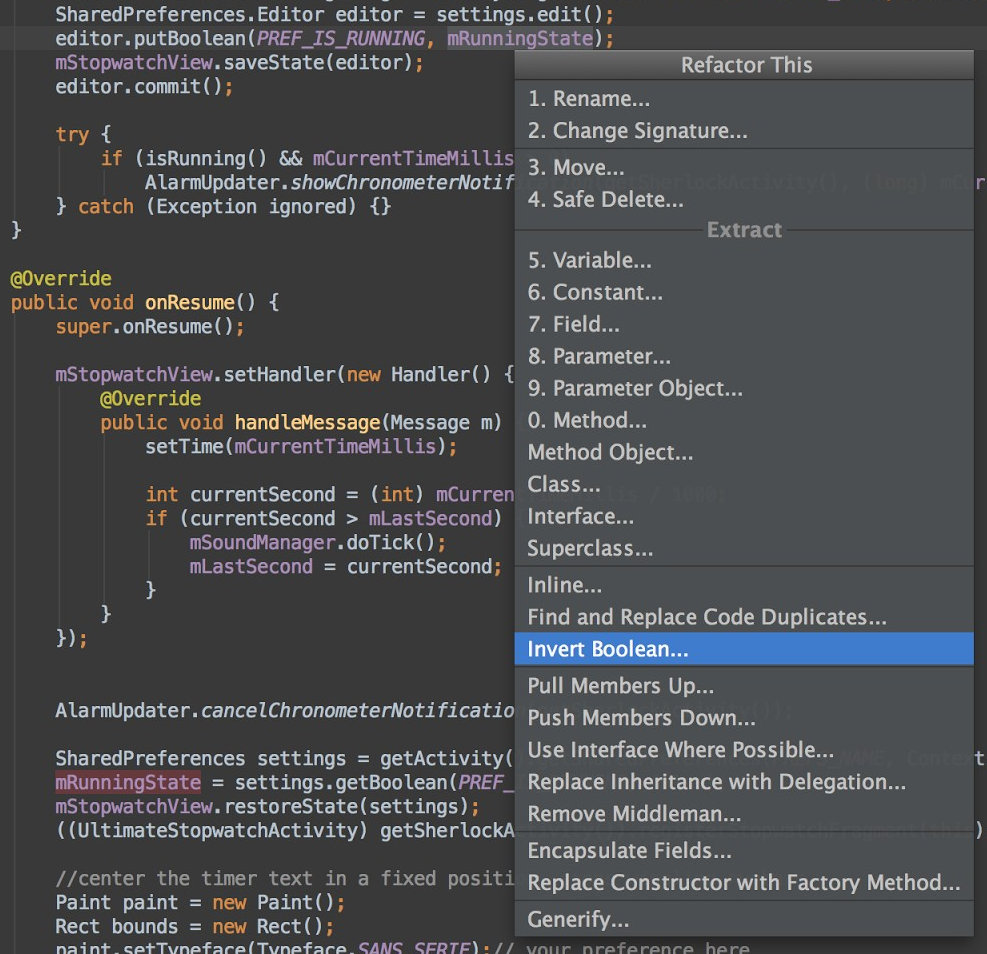
Android Studio includes a powerful code editor. It's based on the IntelliJ IDEA editor, which supports features such as smart editing, advanced code refactoring, and deep static code analysis.


Smart editing features such as inline resource lookups make it easier to read your code, while giving you instant access to edit code the backing resources. Advanced code refactoring gives you the power to transform your code across the scope of the entire project, quickly and safely.


We added static code analysis for Android development, helping you identify bugs more quickly. On top of the hundreds of code inspections that IntelliJ IDEA provides, we’ve added custom inspections. For example, we’ve added metadata to the Android APIs, that flag which methods can return null and which can’t, which constants are allowed for which methods, and so on. Android Studio uses that data to analyze your code and find potential errors.


Smoother and richer GUI


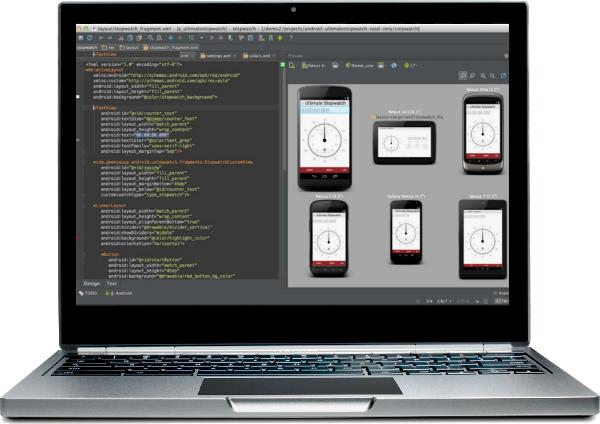
Over the past year we’ve added some great drag-and-drop UI features to ADT and we’re in the process of adding them all into Android Studio. This release of Android Studio lets you preview your layouts on different device form factors, locales, and platform versions.


Easy access to Google services
within Android Tools


We wanted to make it easy for you to harness the power Google services right from your IDE. To start, we’ve made it trivial to add services such a cloud-based backend with integrated Google Cloud Messaging (GCM) to your app, directly from the IDE.


We’ve also added a new plugin called ADT Translation Manager Plugin to assist with localizing your apps. You can use the plugin to export your strings to the Google Play Developer Console for translation, then download and import your translations back into your project.


Open source development


Starting next week we’ll be doing all of our development in the open, so you can follow along or make your own contributions. You can find the Android Studio project in AOSP at https://android.googlesource.com/platform/tools/adt/idea/


Try Android Studio and give us feedback


Give Android Studio a try and send us your feedback! It's free, and the download bundle includes includes everything you need, including the IDE, the latest SDK tools, the latest Android platform, and more. .


Note: This is an early access preview intended for early adopters and testers who want to influence the direction of the Android tools. If you have a production app with a large installed base, there’s no need to migrate your development to the new tools at this time. We will continue to support Eclipse as a primary platform for development.


If you have feedback on the tools, you can send it to us using the Android Studio issue tracker.


Followers