Thursday, 29 March 2012

Making the Android Developer Console work for your whole team

[This post is by Ellie Powers, a product manager on the Google Play team. — Tim Bray]

As your apps have gotten more successful, more people have joined your team. Today, we’re making it easier to work together on analyzing and managing your published Android apps. Sharing passwords is generally a bad idea; so as of now, there’s no need to do that for the Android Developer Console — everyone can use his or her own Google account.


The account that you use today to sign into the Android Developer Console will become the account owner; only the account owner can manage access to the Console. The account owner can email an invitation to anyone; when they accept it, they’ll need to use a Google account to sign in.


Different people in your team do different jobs, so when you invite someone to your Android Developer Console, you’ll be able to specify what access they need. Today, you can limit access per-user to financial reports. In the future, we’ll give you more fine-grained control over access to the Console. For details, see Account owner and user access.


We hope this helps your team collaborate more easily. If you have any issues, feel free to get in touch via the Developer Help Center.


Join the discussion on

+Android Developers


Thursday, 22 March 2012

New Sales Reports on Google Play


[This post is by Debashish Chatterjee, Krishna Atkuru, and Ellie Powers of the Google Play Publisher Site team. —Dirk Dougherty]


For app publishers, complete and timely sales reporting is incredibly useful for managing a business on Google Play. Today we are introducing a new financial tool — Estimated Sales Reports — to give you visibility over ongoing product sales and help you support customers between payout cycles.


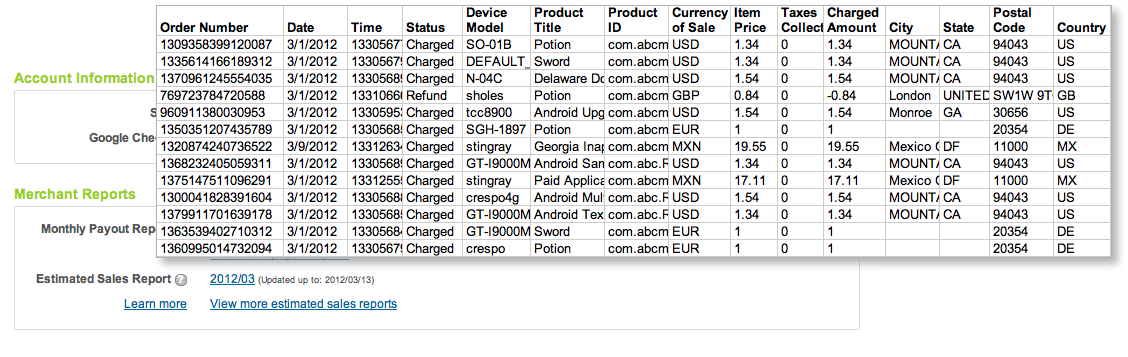
The new sales reports show you complete transaction details of recent sales and refunds for all products in your developer account, including both in-app products and paid apps. Each report is a cumulative for the current payout period, updated nightly with the details of recent transactions. As customers complete purchases and their accounts are charged (or refunds are applied), the new transaction details are appended to the Estimated Sales Report. Depending on account timezone differences, transactions appear on the estimated sales report within 2 days of completion. Finally, at the close of the monthly payout cycle, the current Estimated Sales Report is archived and a new report is created for the next cycle.


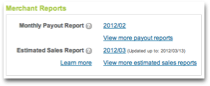
You can access current or past sales reports from the “Merchant Reports” section of the Developer Console. The Estimated Sales Reports are downloadable CSV (comma-separated values) files, so you can analyze the data using any tools you choose, in the same way as you've been doing for payout reports. The sales reports list the same details as payout reports — buyer and order, product, device information, amount, currency of sale, and more — except without final payment details. This makes it easier for you to reconcile recorded sales against your actual payouts. Estimated sales reports are available with data starting February 1, 2012.


We’ve also taken this opportunity to rename our existing “Merchant Sales Reports” to Monthly Payout Reports, to better reflect their content.


Together with the application statistics introduced last month, the Estimated Sales and Monthly Payout Reports give you a more complete view of your products’ download and sales activity over time. We hope you’ll find them useful. As always, please feel free to give us feedback through the Developer Help Center.


Join the discussion on

+Android Developers


Wednesday, 21 March 2012

Updated SDK Tools and ADT revision 17

Today we are releasing an update to the SDK Tools and the Eclipse plugin. Revision 17 brings a lot of new features and bug fixes in various areas such as Lint, the build system as well as the emulator.

Lint is a static checker which analyzes Android projects for a variety of issues around correctness, security, performance, usability and accessibility, checking your XML resources, bitmaps, ProGuard configuration files, source files and even compiled bytecode. It can be run from within Eclipse or from the command line.
New for r17:

  • Added check for Android API calls that require a version of Android higher than the minimum supported version. You can use the new @TargetApi annotation to specify local overrides for conditionally loaded code. For more information, read here.
  • Added over 40 new Lint rules for a total of over 80, including checks for performance, XML layouts, manifest and file handling. For a full list read here.
  • Added ability to suppress Lint warnings in Java code with the new @SuppressLint annotation, and in XML files with the new tools: namespace prefix and ignore attribute. For more information, read here.
  • Improved HTML and XML reporting and Eclipse integration. For more information, read here.

We’ve also made improvements to the build systems for Eclipse and Ant:

  • Added strict dependency support for 3rd party Jar files. You can read more information here.
  • Added support for custom views with custom attributes in libraries. Layouts using custom attributes must use the namespace URI http://schemas.android.com/apk/res-auto instead of the URI that includes the app package name. This URI is replaced with the app specific one at build time.
  • Added a feature that allows you to run some code only in debug mode. Builds now generate a class called BuildConfig containing a DEBUG constant that is automatically set according to your build type. You can check the (BuildConfig.DEBUG) constant in your code to run debug-only functions such as outputting debug logs.

The emulator is seeing some big improvements as well:

  • Thanks to contributions to AOSP from Intel, the emulator now supports running x86 system images in virtualization mode on Windows and Mac OS X. This allows the emulator running at near native speed. The drivers are available through the SDK Manager. Read more here.
  • After adding webcam support and sensor emulation, we are adding experimental support for Multi-Touch input through a tethered Android device. (Read more here)

Finally, we are also releasing an updated Support Library with the following improvements:

  • ShareCompat provides easy helper classes for both sending and receiving content for social sharing apps.
  • NavUtils and TaskStackBuilder provide cross-version support for implementing the Android Design guidelines for navigating within your app including the action bar's "Up" button.
  • NotificationCompat.Builder provides a compatibility implementation of Android 3.0's Notification.Builder helper class for creating standardized system notifications.
  • A new Library Project adds support for GridLayout back to API level 7 and higher.

You can get more information about these changes in the SDK Tools Release Notes and ADT Release Notes.

Tuesday, 13 March 2012

Unifying Key Store Access in ICS

[This post is a group effort by Tony Chan, Fred Chung, Brian Carlstrom, and Kenny Root. — Tim Bray]


Android 4.0 (ICS) comes with a number of enhancements that make it easier for people to bring their personal Android devices to work. In this post, we’re going to have a look at the key store functionality.

Back in Android 1.6 (Donut), a system key store was added for use by VPN. Although this was later expanded to support WiFi authentication, applications weren’t able to access it.

In the past, it was common practice for apps to maintain their own key store if they needed to authenticate a secure SSL web server, or authenticate the user to a server via a client certificate. While this works, it can present manageability issues in an enterprise environment where multiple certificates may be shared across a number of apps such as Email and Browser.

New in ICS: KeyChain

To bridge the gap in ICS, there’s a new API named KeyChain that regulates application access to the system key store and allows users to grant application access to the credentials stored there. Additionally, this API enables applications to initiate installation of credentials from X.509 certificates and PKCS#12 key stores.

The KeyChain API is rather simple. To install a key store or a certificate, you retrieve an install intent, supply the raw bytes of the credentials, and use the intent to launch a system installation dialog. If it’s a keystore, as in the example below, you’ll need provide the data in PKCS#12 format, and the user will have to know the PKCS#12 password.

  byte[] keystore = . . (read from a PKCS#12 keystore)

Intent installIntent = KeyChain.createInstallIntent();
installIntent.putExtra(KeyChain.EXTRA_PKCS12, keystore);
startActivityForResult(installIntent, INSTALL_KEYSTORE_CODE);

The install intent launches a system dialog that prompts the user to enter the password for the keystore.

This can also be used for installing organizational CA certificates which will then be trusted by all applications to authenticate to non-public servers with certificates issued by the same CA.

In ICS, Android no longer requires a separate password to protect the system credential storage. Rather, it uses the screen lock password for this purpose, and the Android Device Administration API can be used for central policy enforcement. This means, for example, that the screen lock password can’t be removed as long as the secured credentials remain on the device.

Accessing System Key Store Credentials

Once the system key store is configured, the KeyChain API offers functions such as requesting a client certificate for authenticating with an SSL server. The first time an application requests access, the user is prompted with a list of available certificates and can select one to grant access to that certificate to the application. If the user chooses to allow access to a certificate, a string alias name for the certificate is returned to the application. The application can then use the alias to access the certificate in the future without further user involvement.

The code below illustrates how an application can prompt the user to select a credential alias and grant access to the application. KeyChain will remember this selection such that the same application can save the credential alias selection and have access to the same certificate in future. For example, the Email application for ICS has implemented this feature in its Server Settings screen.

  KeyChain.choosePrivateKeyAlias(this,
new KeyChainAliasCallback() {

public void alias(String alias) {
// Credential alias selected. Remember the alias selection for future use.
if (alias != null) saveAlias(alias);
}
},
new String[] {"RSA", "DSA"}, // List of acceptable key types. null for any
null, // issuer, null for any
"internal.example.com", // host name of server requesting the cert, null if unavailable
443, // port of server requesting the cert, -1 if unavailable
null); // alias to preselect, null if unavailable

Once an application has been granted access to the certificate, it can access the private key through the getPrivateKey() method. It is worth noting that as with any PrivateKey objects, the application should not make assumptions about the encoding. For example, on some implementations the PrivateKey object may just be an opaque representation of a key stored in a hardware key store.

Here’s a sample code snippet that demonstrates the use of private key retrieved from the key store for signing:

    PrivateKey privateKey = KeyChain.getPrivateKey(context, savedAlias);
if (privateKey != null) {
...
Signature signature = Signature.getInstance("SHA1withRSA");
signature.initSign(privateKey);
...
}

A common use of the private key is for SSL client authentication. This can be implemented by using an HttpsURLConnection with a custom X509KeyManager that returns the PrivateKey retrieved from the KeyChain API. The open source Email application for ICS uses KeyChain with an X509ExtendedKeyManager. To learn more, have a look at the source code (in SSLUtils.java).

This API provides a unified way to access the system key store credentials. If your application uses client certificates (take note: enterprise email client or web browser developers) you should definitely look into the KeyChain API for your next update!

Followers