Wednesday, 13 November 2013

Bring Your Apps into the Classroom, with Google Play for Education

Posted by Shazia Makhdumi, Head of Strategic EDU Partnerships, Google Play team


Google Play for Education has officially launched. It’s an extension of Google Play that’s designed for schools, simplifying discovery of educational apps and enabling developers and content providers to reach K-12 educators in the U.S. It offers bulk purchasing with purchase orders and instant distribution of educational apps, videos and other educational content to students' Android tablets via the cloud. Google Play for Education helps your apps gain visibility with the right audiences, without having to knock on school doors.
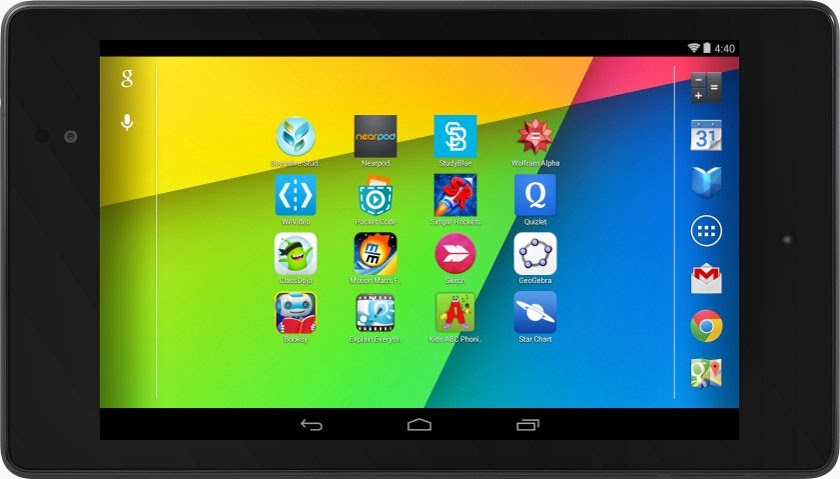


If you've built an Android app that would be awesome for schools—or even have an idea for one—now's the time to jump in. We'll put you one click away from getting purchased and installed by entire school districts. Class Dojo, Explain Everything, Nearpod, and Socrative are already getting discovered in Google Play for Education.


How to join Google Play for Education


If you already have an educational Android app you can use the Google Play Developer Console to mark your apps for inclusion in Google Play for Education. Marking your app identifies it as suitable for the US K-12 educational market and queues it for educator approval. These educators perform a first-pass qualification of apps, assigning the appropriate subject, grade, and common core standards metadata, while evaluating if the app meets the Google Play for Education criteria for classroom use.


Designing great apps for classrooms


High quality apps are top priority for teachers. Whether you already have an existing K-12 educational app or are looking to build one, take a look at our detailed requirements and guidelines—which we have compiled for you based on educator feedback—to ensure your app is appropriate for a K-12 environment. Also ensure that your app is optimized for both 7” and 10” Android tablets. Then, upload your new or updated app through the Developer Console, opt in to Google Play for Education, and publish. We will email you when your app has been evaluated.


For more information, please visit the Google Play for Education pages on the Android developer site. We are excited to be supporting schools to bring the best content and tools to their students. We look forward to seeing your app on Google Play for Education.





Monday, 11 November 2013

Google Play App Translation Service

Posted by Ellie Powers, Google Play team


Today we are happy to announce that the App Translation Service, previewed in May at Google I/O, is now available to all developers. Every day, more than 1.5 million new Android phones and tablets around the world are turned on for the first time. Each newly activated Android device is an opportunity for you as a developer to gain a new user, but frequently, that user speaks a different language from you.


To help developers reach users in other languages, we launched the App Translation Service, which allows developers to purchase professional app translations through the Google Play Developer Console. This is part of a toolbox of localization features you can (and should!) take advantage of as you distribute your app around the world through Google Play.


We were happy to see that many developers expressed interest in the App Translation Service pilot program, and it has been well received by those who have participated so far, with many repeat customers.


Here are several examples from developers who participated in the App Translation Service pilot program: the developers of Zombie Ragdoll used this tool to launch their new game simultaneously in 20 languages in August 2013. When they combined app translation with local marketing campaigns, they found that 80% of their installs came from non-English-language users. Dating app SayHi Chat expanded into 13 additional languages using the App Translation Service. They saw 120% install growth in localized markets and improved user reviews of the professionally translated UI. The developer of card game G4A Indian Rummy found that the App Translation Service was easier to use than their previous translation methods, and saw a 300% increase with user engagement in localized apps. You can read more about these developers’ experiences with the App Translation Service in Developer Stories: Localization in Google Play.


To use the App Translation Service, you’ll want to first read the localization checklist. You’ll need to get your APK ready for translation, and select the languages to target for translation. If you’re unsure about which languages to select, Google Play can help you identify opportunities. First, review the Statistics section in the Developer Console to see where your app has users already. Does your app have a lot of installs in a certain country where you haven’t localized to their language? Are apps like yours popular in a country where your app isn’t available yet? Next, go to the Optimization Tips section in the Developer Console to make sure your APK, store listing, and graphics are consistently translated.


You’ll find the App Translation Service in the Developer Console at the bottom of the APK section — you can start a new translation or manage an existing translation here. You’ll be able to upload your app’s file of string resources, select the languages you want to translate into, select a professional translation vendor, and place your order. Pro tip: you can put your store listing text into the file you upload to the App Translation Service. You’ll be able to communicate with your translator to be sure you get a great result, and download your translated string files. After you do some localization testing, you’ll be ready to publish your newly translated app update on Google Play — with localized store listing text and graphics. Be sure to check back to see the results on your user base, and track the results of marketing campaigns in your new languages using Google Analytics integration.


Good luck! Bonne chance ! ご幸運を祈ります! 행운을 빌어요 ¡Buena suerte! Удачи! Boa Sorte!


Thursday, 31 October 2013

Android 4.4 KitKat and Updated Developer Tools

Posted by Dave Burke, Engineering Director, Android Platform


Today we are announcing Android 4.4 KitKat, a new version of Android that brings great new features for users and developers.


The very first device to run Android 4.4 is the new Nexus 5, available today on Google Play, and coming soon to other retail outlets. We’ll also be rolling out the Android 4.4 update worldwide in the next few weeks to all Nexus 4, Nexus 7, and Nexus 10 devices, as well as the Samsung Galaxy S4 and HTC One Google Play Edition devices.


As part of this release, we kicked off Project Svelte, an effort to reduce the memory needs of Android so that it can run on a much broader range of devices, including entry-level devices that have as little as 512MB RAM. From the kernel to system, frameworks, and apps, we've reduced memory footprint and improved memory management so Android can run comfortably on only 512MB of RAM. We did this not only on Android but across Google apps, like Chrome and YouTube.


By supporting a broader range of devices, Android 4.4 will help move the Android ecosystem forward. Now all users will be able to enjoy the very best that Android has to offer, on the devices that best meet their needs.


Here’s a quick look at some of the new features for developers:


  • New ways to create beautiful apps — A new full-screen immersive mode lets your app or game use every pixel on the screen to showcase content and capture touch events. A new transitions framework makes it easier to animate the states in your UI. Web content can take advantage of a completely new implementation of WebView built on Chromium.


  • More useful than ever — A printing framework lets you add the convenience of printing to your apps. A storage access framework makes it easier for users find documents, photos, and other data across their local and cloud-based storage services. You can integrate your app or storage service with the framework to give users instant access to their data.


  • Low-power sensors — New hardware-integrated sensors let you add great new features to your apps without draining the battery. Included are a step detector and step counter that let you efficiently track of the number of walking steps, even when the screen is off.


  • New media capabilities — A new screen recorder lets you capture high-quality video of your app directly from your Android device. It's a great new way to create walkthroughs, tutorials, marketing videos, and more. Apps can use adaptive playback to offer a significantly better streaming video experience.


  • RenderScript in the NDK — A new C++ API in the Android Native Development Kit (NDK) lets you use RenderScript from your native code, with access to script intrinsics, custom kernels, and more.


  • Improved accessibility support — New system-wide captioning settings let your apps present closed captions in the style that's preferred by the user.


There's a lot more, so be sure to check out the Android 4.4 platform highlights for a complete overview of those and other new capabilities for developers. For details on the APIs and how to use them, take a look at the API Overview or watch one of the new DevBytes videos on KitKat.


Along with the new Android 4.4 platform we're releasing a new version of the Android NDK (r9b). The new NDK gives you native access to RenderScript and other stable APIs in Android 4.4, so if you've been waiting to use RenderScript from your native code, give it a try.


Last, we've updated the Support Package (r19) with a new helper library for printing images through the new printing framework, as well as other updates.


You can get started developing and testing on Android 4.4 right away, in Android Studio or in ADT/Ant. You can download the Android 4.4 Platform (API level 19), as well as the SDK Tools, Platform Tools, and Support Package from the Android SDK Manager.


Google Play Services 4.0

Today we're launching a new release of Google Play services. Version 4.0 includes the Google Mobile Ads SDK, and offers improvements to geofencing, Google+, and Google Wallet Instant Buy APIs.


With over 97% of devices now running Android 2.3 (Gingerbread) or newer platform versions, we’re dropping support for Froyo from this release of the Google Play services SDK in order to make it possible to offer more powerful APIs in the future. That means you will not be able to utilize these new APIs on devices running Android 2.2 (Froyo).


We’re still in the process of rolling out to Android devices across the world, but you can already download the latest Google Play services SDK and start developing against the new APIs using the new Android 4.4 (KitKat) emulator.


Google Mobile Ads


If you’re using AdMob to monetize your apps, the new Google Mobile Ads SDK in Google Play services helps provide seamless improvements to your users. For example, bug fixes get pushed automatically to users without you having to do anything. Check out the post on the Google Ads Developer Blog for more details.


Maps and Location Based Services


The Maps and Geofencing APIs that launched in Google Play services 3.1 have been updated to improve overall battery efficiency and responsiveness.


You can save power by requesting larger latency values for notifications alerting your app to users entering or exiting geofences, or request that entry alerts are sent only after a user stays within a geofence for a specified period of time. Setting generous dwell times helps to eliminate unwanted notifications when a user passes near a geofence or their location is seen to move across a boundary.


The Maps API enhances map customization features, letting you specify marker opacity, fade-in effects, and visibility of 3D buildings. It’s also now possible to change ground overlay images.


Google+ and Google Wallet Instant Buy


Apps that are enabled with Google+ Sign-In will be updated with a simplified sign-in consent dialog. Google Wallet Instant Buy APIs are now available to everyone to try out within a sandbox, with a simplified API that streamlines the buy-flow and reduces integration time.


Google Wallet Instant Buy also includes new Wallet Objects, which means you can award loyalty points to a user's saved rewards program ID for each applicable Google Wallet Instant Buy purchase.


New user control over advertising identifier


To give users better controls and to provide you with a simple, standard system to continue to monetize your apps, this update contains a new, anonymous identifier for advertising purposes (to be used in place of Android ID). Google Settings now includes user controls that enable users to reset this identifier, or opt out of interest-based ads for Google Play apps.


More About Google Play Services


To learn more about Google Play services and the APIs available to you through it, visit the Google Services area of the Android Developers site.


Followers